Loading...
EXE-File Binder

Compatibility:
Supports all tested Windows versions (Windows 7 through to Windows 11) and all file formats.
1. Builder Features
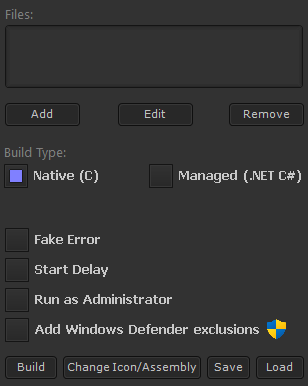
- Files:
This section lists all files that will be bound and executed (if selected). You may add new files, edit existing entries, or remove them as needed.
- Build Type:
You can choose to compile the miner as either a 32-bit native assembly (written in C) or a managed assembly (written in C#).
- Fake Error:
Displays a custom error message upon launching the file. You may also select the message box style, including its icon and layout.
- Start Delay:
Introduces a pause (in seconds) before dropping and executing the bound files. This can help evade sandbox detection, including Windows Defender’s analysis.
- Run as Administrator:
Determines whether the program should request elevated privileges upon execution. This is necessary for the "Add Windows Defender exclusions" feature.
- Add Windows Defender Exclusions:
Adds exclusions for the following directories: %UserProfile% and %SystemRoot% before any files are downloaded. Enabling this option should prevent Windows Defender from flagging dropped files.
2. File Features
- Filename:
The name of the dropped file, including its extension (.exe, .txt, .jpg, etc.).
- Icon/Assembly:
These options apply only when building a managed assembly. The Icon setting defines the file’s displayed icon, while Assembly configures metadata (visible in Windows properties and other system dialogs).
----------------------------------------------------------
How can I minimise detections?
If you're compiling it as a native assembly, you may use any crypter. Conversely, if you're building it as a managed assembly, an obfuscator would be more suitable. For those proficient in C or C#, modifying the Program.c or Program.cs file, respectively, can further reduce detection rates.
Product images
Replies
Confirm Deletion
Are you sure you want to delete this reply? This action cannot be undone.
There are no replies yet. Be the first to reply.